

The sub-₹15,000 gaming monitor segment has changed a lot in a short span of time. What used to mean a 60Hz TN panel now regularly includes 165Hz, 180Hz, and even 240Hz refresh rates, features that required spending ₹25,000 or more just a couple of years ago. The real challenge now isn't finding a capable monitor at this price; it's picking the right one for how you actually play and what you're pairing it with.

How We Chose These Monitors
We compared official specification sheets, current Amazon and Flipkart India pricing, and verified buyer feedback across multiple listings for each monitor. If you're new to gaming displays, our complete monitor buying guide explains important terms like panel types, refresh rates, adaptive sync, HDR, and connectivity in greater detail. Priority went to panel type and adaptive sync support first, since these affect day-to-day image quality and tear-free gameplay more than headline response-time numbers. We also cross-checked availability across at least two Indian retailers before including a model, and excluded listings where panel specifications were inconsistent between sellers.
Things we considered for every pick: price stability across retailers, panel type (IPS vs VA vs TN), refresh rate against realistic GPU pairings, adaptive sync compatibility, warranty and India service network, and connectivity (HDMI version, DisplayPort, VESA mount support).
Who Should Buy Which Monitor?
Choose a monitor from this guide if:
- You play Valorant, CS2, or BGMI competitively and want a real frame rate advantage
- You're gaming on a PS5 or Xbox Series X and want HDMI 2.1 features like VRR
- You pair with an RTX 4060, RX 7600, or similar mid-range GPU capable of hitting high frame rates
- You mostly play story-driven or single-player games and want good color accuracy over raw speed
- You use a laptop for gaming and want a larger, faster external display
What Actually Matters Before You Buy
Refresh rate determines how many times per second your screen updates, and it's the biggest single factor in how smooth fast motion looks. Anything from 144Hz to 240Hz counts as high refresh at this budget. The jump from 60Hz to 144Hz is immediately noticeable in competitive titles; tracking fast-moving targets becomes measurably easier, with less motion blur and ghosting trailing behind on-screen movement.
Panel type matters more than most buyers expect, and it's worth understanding the real trade-off. IPS panels now dominate this segment and offer better color accuracy (typically 99% sRGB coverage or close to it) and wider viewing angles, which are useful if you also use the monitor for work or streaming. VA panels trade some of that color consistency for deeper blacks and higher contrast, which some players prefer for horror games or dark, atmospheric titles, though they can show more ghosting during fast motion than a comparable IPS panel. TN panels are largely obsolete at this budget in 2026 and worth avoiding if IPS or VA alternatives exist at a similar price.
Response time figures like 0.5ms or 1ms look impressive on a spec sheet. These numbers are typically achieved using motion blur reduction modes under specific test conditions, not necessarily how the panel behaves in every game. Input lag, the delay between your action and its appearing on screen, matters just as much for competitive play but is advertised far less often. Most modern IPS and VA panels in this price range are fast enough for competitive play regardless of the exact millisecond figure on the box.
Adaptive sync (AMD FreeSync or NVIDIA G-Sync Compatible) prevents screen tearing by matching your monitor's refresh rate to your GPU's frame output, part of the broader category called VRR (Variable Refresh Rate). This is worth prioritizing. A high refresh rate monitor without adaptive sync can still tear during fast-action scenes even at 165Hz or higher.
Is HDR Worth It at This Price?
HDR10 support shows up on several monitors in this budget, but treat it as a minor bonus, not a deciding factor. Genuine HDR impact depends on peak brightness and local dimming zones, both of which are typically limited on sub-₹15,000 panels. You'll get slightly better highlight detail in supported games and media, but nothing close to the HDR experience on a premium display. Don't pay a meaningful premium purely for an HDR10 badge at this price point.
Should You Buy 24-Inch or 27-Inch?
This comes down to your desk depth and how close you sit. At 1080p resolution, 27-inch panels start showing visible pixel structure if you sit closer than roughly 60cm, since the same pixel count is stretched over a larger area. If your desk is deep or you sit further back, a 27-inch display feels more immersive without a downside. If you sit close to your screen, a 24-inch panel keeps text and detail sharper at the same 1080p resolution.
HDMI vs DisplayPort: Does It Matter?
For PC gaming, DisplayPort 1.4 generally offers more consistent high-refresh-rate performance and is the preferred connection where both are available. HDMI 2.1, found on several monitors in this list, matters specifically if you're connecting a PS5 or Xbox Series X, since it enables console VRR and higher refresh rates at 1080p and 1440p that older HDMI 2.0 ports can't handle. Check your monitor's exact HDMI version before assuming console compatibility, since some budget models still ship with HDMI 2.0 only.
Budget-Wise Recommendation
| Budget | Best Choice | Why We Recommend It |
|---|---|---|
| ₹10,000–₹11,500 | Acer Nitro VG240Y X1 | Best value for buyers moving to their first high-refresh IPS gaming monitor. |
| ₹10,500–₹13,000 | Lenovo Legion 24-10 | Best choice for competitive esports players who prioritize refresh rate. |
| ₹12,000–₹14,000 | Gigabyte G24F 2 | Best overall combination of image quality, gaming performance, and everyday usability. |
| Around ₹15,000 | Lenovo Legion R27qe Gen 2 | Best upgrade for gamers looking to move to a sharper 1440p gaming experience. |
Best Picks at a Glance (Winner Boxes)
| If you want... | Buy this |
|---|---|
| Best Overall | Gigabyte G24F 2 |
| Highest Refresh Rate | Lenovo Legion 24-10 |
| Best 1440p Experience | Lenovo Legion R27qe Gen 2 |
| Best Value | Acer Nitro VG240Y X1 |
| Best Ergonomics | LG UltraGear 24GN65R |
Best Overall: Gigabyte G24F 2
This is one of the strongest all-around 1080p gaming monitors in this budget segment, pairing a 24-inch IPS panel with a native 165Hz refresh rate that can be overclocked to 180Hz, along with adaptive sync support to keep gameplay tear-free. Its on-screen display offers detailed control over color profiles and overdrive settings, and the slim-bezel design suits a dual-monitor setup down the line, with VESA mount compatibility if you'd rather wall-mount or arm-mount it than use the included stand.

- Excellent balance of refresh rate and color accuracy
- Overclockable display panel
- Detailed on-screen display (OSD) controls
- Supports VESA wall and monitor arm mounting
- No HDMI 2.1 connectivity
- Average built-in speakers
- Basic HDR performance
Worth buying if: You want one monitor that performs well across competitive gaming, single-player titles, work, and everyday use. It delivers one of the best overall balances of refresh rate, image quality, and long-term value in this price range.
Best for Competitive Esports: Lenovo Legion 24-10
If your priority is pure speed for Valorant, CS2, or BGMI, the Legion 24-10 offers a 240Hz refresh rate for this budget bracket alongside a 23.8-inch IPS panel, 0.5ms response time, and 99% sRGB coverage. It supports both AMD FreeSync Premium and NVIDIA G-Sync, meaning it stays tear-free regardless of whether you're running an AMD or NVIDIA GPU. Confirmed listings across Amazon, Flipkart, and Lenovo's own India store put pricing between roughly ₹10,300 and ₹13,000, depending on retailer and ongoing offers.

- Highest refresh rate on this list
- Supports both AMD FreeSync and NVIDIA G-Sync
- Fully ergonomic stand with tilt, swivel, pivot, and height adjustment
- Excellent price-to-performance ratio
- Smaller 23.8-inch display
- No HDMI 2.1 support
- Requires a powerful GPU like an RTX 4060 or RX 7600 to consistently reach 240 FPS
Worth buying if: Competitive FPS games are your priority and your PC can consistently produce very high frame rates. The extra refresh rate is most beneficial in esports titles where smooth motion and fast response matter.
Best 1440p Option: Lenovo Legion R27qe Gen 2
1440p (QHD) monitors under ₹15,000 typically come with real compromises elsewhere, but the R27qe Gen 2 is a rare exception worth calling out. Its 27-inch IPS panel runs at a genuine 1440p resolution while still hitting a 200Hz refresh rate, providing sharper image quality than any 1080p option on this list, provided your GPU can push enough frames at that higher resolution to take advantage of it. It includes HDMI 2.1 connectivity and DisplayPort 1.4, along with a full ergonomic stand.

- Sharp 1440p resolution with a high refresh rate
- HDMI 2.1 support for modern consoles
- Excellent color accuracy
- Fully adjustable ergonomic stand
- Requires a more powerful GPU for high FPS at 1440p
- Priced at the higher end of the budget segment
- Availability may vary by region
Worth buying if: You're upgrading to 1440p and have a graphics card capable of maintaining good frame rates at higher resolutions. It offers noticeably sharper visuals than standard 1080p monitors.
Best Established Brand Pick: AOC 24G2
Priced close to the top of this budget at around ₹14,999, the AOC 24G2 delivers a 165Hz refresh rate and 1ms response time on an IPS panel, a combination that would have cost significantly more just two years ago. AOC has a long-standing reputation specifically in the gaming monitor space, and this remains a dependable choice if you'd rather buy from a brand with an established gaming monitor track record.

- Trusted brand with a strong gaming monitor reputation
- Accurate and consistent color reproduction
- Reliable Adaptive Sync performance
- Priced at the upper end of this budget range
- Fewer ergonomic adjustments than some Lenovo models
- Basic on-screen display (OSD) menu
Worth buying if: You prefer buying from an established gaming monitor brand and want a dependable IPS display with proven gaming performance instead of chasing the highest specifications.
Best for Ergonomics and Multi-Use: LG UltraGear 24GN65R
This one stands out less for raw specs and more for physical design. The UltraGear 24GN65R's stand rotates a full 90 degrees between landscape and portrait orientation, useful if you also use the monitor for reading, coding, or social media browsing alongside gaming, without needing a separate VESA mount. It runs at a 144Hz refresh rate, includes a blue light filter and flicker-free technology for longer sessions, and maintains consistent brightness across viewing angles.

- Unique rotating stand with portrait mode support
- Flicker-free display with low blue light technology
- Solid and durable build quality
- Lower refresh rate than most other monitors on this list
- No HDMI 2.1 support
Worth buying if: Gaming isn't your only use case. The ergonomic stand and eye-care features make it a practical choice for long work sessions, coding, studying, and content consumption alongside gaming.
Best Ultra-Budget Entry: Acer Nitro VG240Y X1
If you want to spend as little as possible while still getting a genuinely capable refresh rate, the VG240Y X1 is a strong entry point. It's a 23.8-inch IPS panel with a 200Hz refresh rate, 0.5ms response time, 99% sRGB coverage, HDR10 support, and AMD FreeSync Premium, along with Acer's Eye Care features to reduce strain over long sessions. Note that Acer's Nitro lineup includes several similarly named variants with different panel types, so confirm you're buying the IPS "X1" variant specifically rather than an older TN model listed under a similar name.
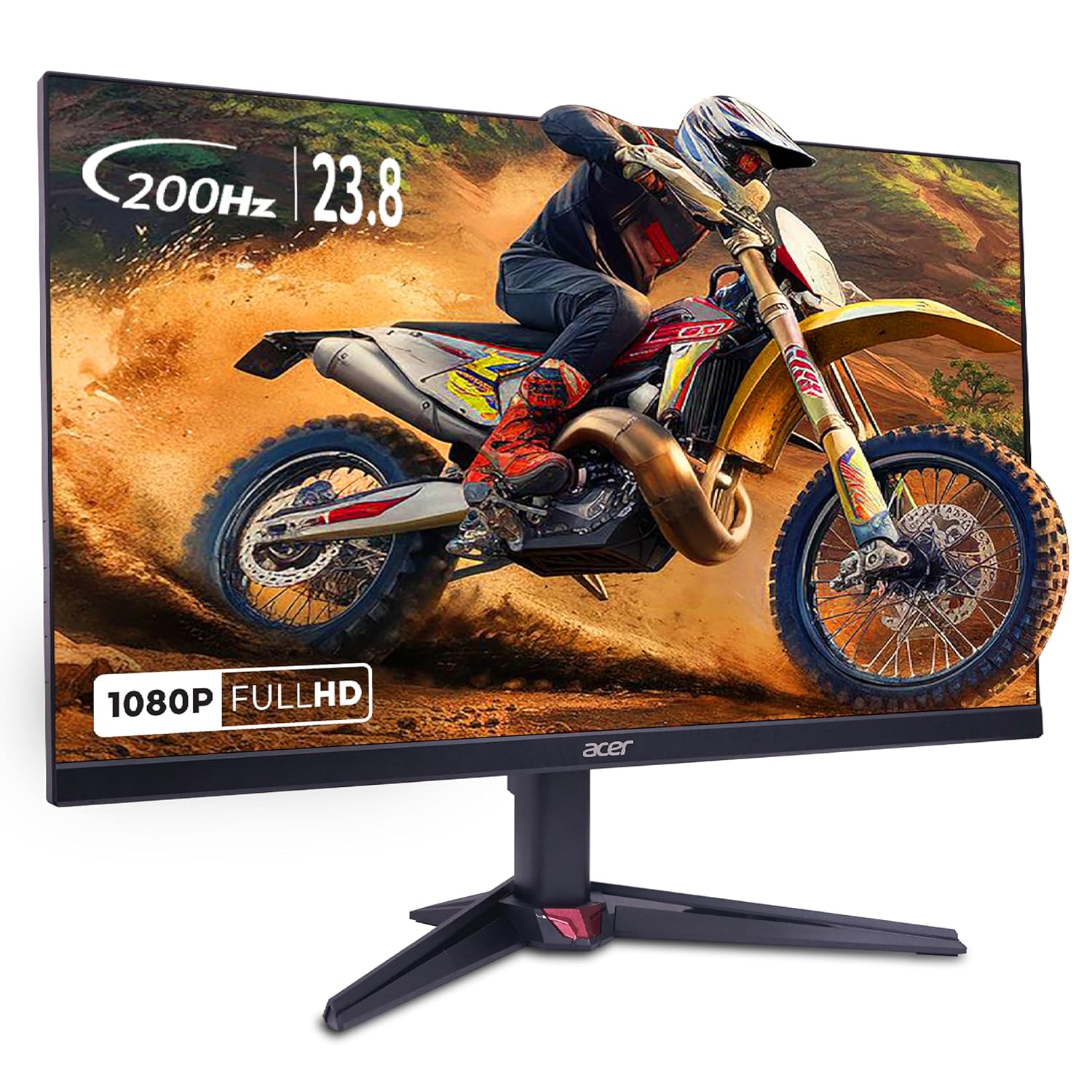
- Genuinely affordable price
- IPS panel with excellent sRGB color coverage
- HDR10 support
- Built-in Eye Care features for comfortable viewing
- Smaller display than the 27-inch alternatives
- Basic built-in speakers
- Watch for panel-type differences across similarly named Acer variants
Worth buying if: You're moving from a basic office monitor to your first high-refresh gaming display and want the best possible gaming experience without spending close to the ₹15,000 limit.
Avoid Buying If
- Avoid a 240Hz monitor if your GPU can't consistently push past 150–180fps in your games, since you won't see the benefit over a 165Hz panel.
- Avoid a 1440p monitor if you're running an older or entry-level GPU like a GTX 1650, since you won't hit high frame rates at that resolution.
- Avoid a VA panel if competitive FPS accuracy matters more to you than contrast; IPS remains the safer choice for fast-paced shooters.
- Avoid a 27-inch 1080p monitor if you sit closer than about 60cm to your screen; pixel structure becomes noticeably visible at that distance.
- Avoid assuming HDMI support means high refresh rate at 1440p or with a console; check the exact HDMI version (2.0 vs 2.1) before buying.
Full Comparison
| Monitor | Size | Panel | Refresh | Adaptive Sync | HDR | Best For | Price |
|---|---|---|---|---|---|---|---|
| Gigabyte G24F 2 | 24" | IPS | 165Hz (OC 180Hz) | FreeSync | Basic | All-round gaming | ~₹12,000–13,500 |
| Lenovo Legion 24-10 | 23.8" | IPS | 240Hz | FreeSync + G-Sync | No | Competitive esports | ~₹10,300–13,000 |
| Lenovo Legion R27qe Gen 2 | 27" | IPS, QHD | 200Hz | FreeSync | HDR10 | Sharper visuals | ~₹14,000–15,000 |
| AOC 24G2 | 24" | IPS | 165Hz | FreeSync | Basic | Brand reliability | ~₹14,999 |
| LG UltraGear 24GN65R | 24" | IPS | 144Hz | FreeSync | Basic | Multi-use/ergonomics | ~₹11,000–12,500 |
| Acer Nitro VG240Y X1 | 23.8" | IPS | 200Hz | FreeSync | HDR10 | Tightest budget | ~₹10,000–11,000 |
Match the Monitor to Your GPU, Not Just Your Budget
A high refresh rate monitor is only as useful as your graphics card's ability to push frames to match it. Pairing a 240Hz monitor with a GPU that struggles to hit 100fps means paying for headroom you won't use yet. A 1440p panel demands meaningfully more GPU power than 1080p to hit high frame rates consistently, so an RTX 4060 or RX 7600-class GPU is a reasonable minimum if you're going the Legion R27qe Gen 2 route. If you're building or upgrading a PC alongside this monitor purchase, check your GPU's realistic frame rate ceiling in your most-played games first.
Best Gaming Monitor Under ₹15,000 for PS5
Although most modern gaming monitors work with the PS5, not every model offers the same console experience. If PS5 gaming is your primary focus, pay attention to the HDMI version, VRR support, and the refresh rates actually supported by the console. Since the PS5 currently supports gameplay up to 120Hz in compatible titles, buying a 240Hz monitor only for console gaming usually doesn't provide a practical advantage. Among the options in this guide, the Lenovo Legion R27qe Gen 2 is the strongest choice if you also want a sharper 1440p gaming experience, while the Gigabyte G24F 2 remains an excellent all-round option for mixed PC and console gaming.
Best Gaming Monitor Under ₹15,000 for RTX 4060
An RTX 4060 pairs comfortably with most monitors in this list. If you mainly play competitive games like Valorant or CS2, the Lenovo Legion 24-10 makes the most sense because the GPU can take advantage of higher frame rates in esports titles. If you play a mix of competitive and AAA games, the Gigabyte G24F 2 offers a better balance between image quality and refresh rate. Gamers planning to move toward sharper visuals can also consider the Lenovo Legion R27qe Gen 2, provided they're comfortable reducing graphics settings in more demanding games when necessary.
Best Gaming Monitor Under ₹15,000 for Video Editing
Gaming monitors can also work well for content creation when they use quality IPS panels with good color coverage. Among the monitors in this guide, the Lenovo Legion R27qe Gen 2 stands out because its higher 1440p resolution provides additional workspace, while the IPS panel is better suited to photo editing, video editing, and general creative work than older TN alternatives. If your workflow is split between gaming and productivity, it's one of the most versatile options here.
Frequently Asked Questions
Is 1080p or 1440p better under ₹15,000?
For most gamers, 1080p remains the better value choice at this budget, since 1440p monitors here often involve some compromise in refresh rate or panel quality elsewhere. If your GPU can push 1440p at a comfortable frame rate, the Lenovo Legion R27qe Gen 2 is a solid exception.
Is a curved monitor worth it at this price?
Curved options exist near the top of this budget, but the curve effect is subtle on 24- to 27-inch screens and matters far more on ultrawide displays. At this size and price, a flat IPS panel with better specs elsewhere is usually the smarter trade-off.
Is a 24-inch better than a 27-inch for gaming?
Neither is objectively better; it depends on viewing distance. 24-inch keeps 1080p sharper if you sit close, while 27-inch feels more immersive at a normal desk distance, provided you're not sitting too close for the pixel density to hold up.
Can a PS5 run at 165Hz on these monitors?
Only in supported games and only through an HDMI 2.1 port. The PS5 can output above 120Hz in select titles, but you'll need a monitor with a genuine HDMI 2.1 connection, like the Legion R27qe Gen 2, rather than an older HDMI 2.0 port to take advantage of it.
Does HDMI support 165Hz?
It depends on the HDMI version and resolution. HDMI 2.0 typically caps out around 144Hz at 1080p, while HDMI 2.1 comfortably supports 165Hz and higher. Check the exact port version listed for each monitor rather than assuming.
Can an RTX 3050 push 240Hz?
Not consistently in most modern, demanding titles. An RTX 3050 handles esports titles like Valorant or CS2 well at high frame rates, but pairing it with a 240Hz monitor for graphically heavier games means you won't consistently reach that ceiling.
Can I use a gaming monitor for office work?
Yes, and IPS panels in this list are genuinely well-suited to it. Features like flicker-free technology and blue light filters, present on picks like the LG UltraGear 24GN65R, specifically help with long working sessions.
Which monitor here is best for video editing under ₹15,000?
The Lenovo Legion R27qe Gen 2 is the strongest choice for color-sensitive work, thanks to its higher resolution and IPS panel with strong sRGB coverage, though none of these monitors are a substitute for a dedicated color-accurate display if you're doing professional grading work.
The Bottom Line
The best gaming monitor under ₹15,000 in India in 2026 depends far more on your specific playstyle and GPU pairing than on any single spec sheet number. Pick the Gigabyte G24F 2 for the strongest overall balance, the Legion 24-10 if competitive frame rate is everything, the Legion R27qe Gen 2 if you want sharper visuals and have the GPU to back it, or the Acer Nitro VG240Y X1 if you're working with the tightest possible budget. Every option here delivers real value that simply wasn't available at this price range a few years ago.
Info!
Prices and availability were last checked in July 2026. We update this guide regularly as new gaming monitors launch or prices change in India.
