

Spend ₹60,000 on the wrong gaming laptop in 2026, and you'll get a machine that stutters through GTA V and struggles with anything released after 2022. Spend it on the right one, and you get smooth esports performance, playable AAA titles, and a laptop that stays relevant for the next three to four years. The difference almost entirely comes down to one component: the GPU. Everything else on the spec sheet matters less than most listings make it seem.

The GPU Hierarchy You Actually Need to Know
Under ₹60,000, you're choosing between three real GPU tiers, and the gap between them is bigger than the numbers suggest.
RTX 3050 is the clear winner in this budget. It carries full DLSS support, typically runs at an 80W power limit in laptops at this price, and handles 1080p medium-high settings comfortably in modern titles. It's the safest long-term pick, with enough headroom to stay relevant through 2028.
RTX 2050 sits meaningfully behind the RTX 3050, roughly 20 to 30% slower in raw rasterization, but it still includes DLSS upscaling, letting the GPU render at a lower internal resolution and reconstruct a sharper image using AI. Paired with a strong CPU, it remains a genuinely solid choice, especially if the laptop offering it comes with better multitasking performance elsewhere.
GTX 1650 is only worth considering below roughly ₹40,000. It has no DLSS support and an aging architecture that struggles against modern game requirements. It's fine for Valorant and CS2 specifically, but little beyond that at playable settings.
Avoid entirely: Intel Iris Xe integrated graphics, AMD Radeon Vega integrated graphics, and Nvidia's MX550. None of these are real gaming GPUs, regardless of how a listing frames them. A laptop advertising "graphics" without naming a dedicated RTX or GTX model, or an AMD RX equivalent, is not built for gaming.
What You Can Actually Expect to Play
- Esports titles (Valorant, CS2, BGMI, Apex Legends) run genuinely well on both RTX 3050 and RTX 2050 laptops, typically 130 to 200 FPS in Valorant and 80 to 140 FPS in CS2, fully using a 144Hz display rather than wasting it.
- Mid-tier AAA titles (GTA V, Forza Horizon 5, Shadow of the Tomb Raider) run at roughly 70 to 100 FPS on medium settings on an RTX 3050, smooth and genuinely enjoyable without maxing every slider.
- Demanding modern AAA titles (Cyberpunk 2077, Alan Wake 2, Avatar: Frontiers of Pandora) need DLSS switched on to be playable, typically landing in the 40 to 60 FPS range at medium settings once DLSS is doing its job. Without DLSS, expect these titles to struggle regardless of which GPU tier you pick at this budget.
The Indian Thermal Reality: Most Reviews Don't Account For
This is worth understanding before you trust any single benchmark number you read online, including the ones in this guide. Most gaming laptop reviews, especially from international YouTube channels and tech sites, are recorded in air-conditioned studios at around 20 to 22°C. Indian summers regularly push past 35°C, and in many homes without AC in every room, ambient temperatures during gaming sessions can climb even higher. Under those conditions, laptops that look impressive in a cool studio review can throttle noticeably harder in an actual Indian bedroom in May or June.
This isn't a small detail. It's the difference between a laptop hitting its advertised frame rates and one quietly dropping 15 to 20% of its performance an hour into a gaming session because the CPU has throttled to protect itself from heat. When comparing laptops, prioritize models with dual fans and at least three exhaust vents, and treat thin-and-light gaming laptops with real skepticism; slim chassis designs generally sacrifice the airflow headroom that Indian conditions specifically punish.
Best Overall: Acer Nitro V 15
Pairing an AMD Ryzen 5 7535HS with an 80W RTX 3050, 16GB of DDR5 RAM, and a 15.6-inch 144Hz IPS display, the Nitro V 15 currently offers the strongest combination of gaming performance and price in this bracket, typically listed around ₹58,990. It's worth noting specifically that this exact model has been recorded hitting CPU temperatures near 91°C in cooler international test conditions, a useful reminder to monitor thermals yourself in Indian conditions and consider a cooling pad for extended sessions in peak summer.
- Best GPU performance for the price in this budget
- True 144Hz display panel
- 16GB RAM comes as standard
- Can run hot during extended gaming sessions
- A cooling pad is recommended for Indian summer conditions

Verdict: Buy this if gaming performance is your highest priority. The RTX 3050 gives it the best long-term value under ₹60,000, making it the strongest overall recommendation for most gamers.
Best for Multitasking and Streaming: ASUS TUF Gaming A15
If you split your time between gaming and CPU-heavy work, streaming, video editing, or general multitasking, the TUF Gaming A15 is worth the trade-off. It pairs an octa-core Ryzen 7 7435HS, the most modern and capable CPU in this entire price bracket, with an RTX 2050, priced around ₹54,990 to ₹55,990. The eight-core CPU delivers noticeably smoother multitasking and stronger CPU-side frame rates in titles that lean on multiple threads, even though its GPU sits a tier below the Nitro V's RTX 3050.
- Most modern CPUs in this price range
- Excellent overall processing performance
- Solid build quality
- DDR5 RAM for better future compatibility
- RTX 2050 is noticeably slower than the RTX 3050 in gaming
- Weaker raw rasterization performance than RTX 3050 laptops

Verdict: Choose this if you spend as much time editing, streaming, programming, or multitasking as gaming. The Ryzen 7 processor is its biggest advantage.
Best for Students: HP Victus 15
The Victus 15 earns its place here less on raw specs and more on presentation and balance. Available with an RTX 3050 configuration around ₹56,990, it carries a clean, professional design that doesn't scream "gaming laptop" in a classroom or office setting, alongside genuinely competitive gaming performance and reasonable battery backup for a dedicated-GPU laptop.
- Clean, understated design for work or college
- Solid RTX 3050 gaming performance
- Good battery life for a gaming laptop
- Some variants use an older or less powerful CPU
- Check the exact configuration before purchasing

Verdict: A great all-round choice for students and office users who also want strong gaming performance without carrying an aggressively styled gaming laptop.
Best Budget Entry: MSI Bravo 15
If ₹60,000 is more than you want to spend and you're primarily focused on esports titles, the MSI Bravo 15 undercuts every other laptop on this list at around ₹42,990, running an AMD RX 6500M GPU. It won't touch demanding AAA titles at playable settings, but for Valorant, CS2, and similar competitive games at a 144Hz refresh rate, it covers the essentials without the premium.
- Most affordable laptop on this list
- 144Hz display for smooth gameplay
- Well-suited for esports and competitive gaming
- RX 6500M is noticeably slower than RTX 2050 and RTX 3050
- Limited performance in demanding AAA games
- No DLSS or equivalent AI upscaling support
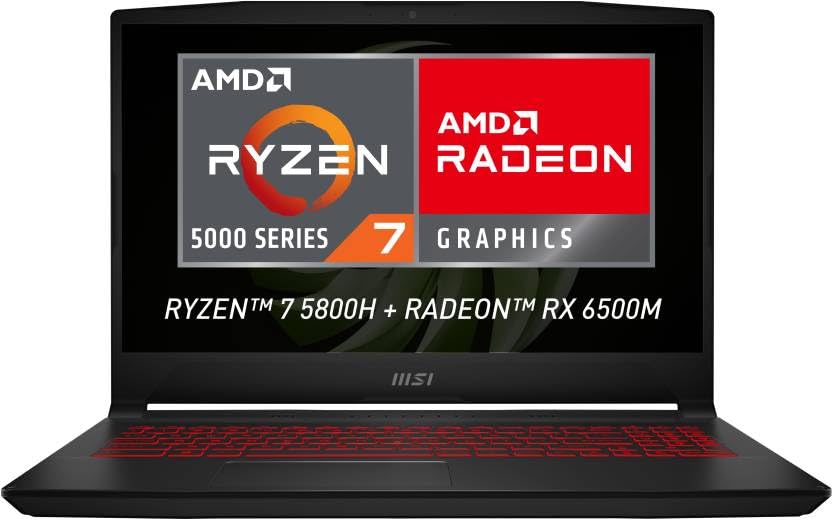
Verdict: Best for buyers with a tighter budget who mainly play esports titles. Spend more for an RTX 3050 if modern AAA games are important to you.
Quick Comparison
| Laptop | CPU | GPU | Display | Weight* | Battery* | RAM Upgrade | Storage Upgrade | MUX Switch | Warranty | Best For |
|---|---|---|---|---|---|---|---|---|---|---|
| Acer Nitro V 15 | Ryzen 5 7535HS | RTX 3050 | 15.6" FHD IPS 144Hz | ~2.1 kg | ~4–6 hrs normal use | Yes | Yes | No | 1 Year | Best gaming performance |
| ASUS TUF Gaming A15 | Ryzen 7 7435HS | RTX 2050 | 15.6" FHD IPS 144Hz | ~2.2kg | ~5–7 hrs normal use | Yes | Yes | No (varies by model) | 1 Year | Streaming & multitasking |
| HP Victus 15 | Varies | RTX 3050 | 15.6" FHD IPS 144Hz | ~2.3kg | ~5–6 hrs normal use | Yes | Yes | No | 1 Year | Students |
| MSI Bravo 15 | Ryzen 5 7535HS | RX 6500M | 15.6" FHD IPS 144Hz | ~2.3kg | ~4–5 hrs normal use | Yes | Yes | No | 1 Year | Budget gaming |
Info!
*Weight and battery life vary slightly depending on the exact configuration and real-world usage.
Who Should Buy Which Laptop?
| If You Are... | Recommended Laptop | Why |
|---|---|---|
| Want the highest gaming FPS | Acer Nitro V 15 | RTX 3050 delivers the strongest gaming performance in this budget. |
| A student who also needs a professional-looking laptop | HP Victus 15 | Cleaner design, good battery life, and solid RTX 3050 gaming performance. |
| Stream, edit videos, or multitask frequently | ASUS TUF Gaming A15 | Ryzen 7 7435HS offers the strongest CPU performance in this price range. |
| Spending as little as possible | MSI Bravo 15 | Lowest price while still offering a dedicated gaming GPU and 144Hz display. |
| Mainly play Valorant, CS2, or other esports games | MSI Bravo 15 or Acer Nitro V 15 | Both handle competitive games well, with the Nitro providing much more room for future AAA titles. |
Common Mistakes to Avoid
- Buying a 60Hz display when 144Hz is available at the same price. A 60Hz panel caps what you see at 60 frames per second, regardless of how many FPS your GPU is actually producing, meaning you'd be paying for RTX 3050 performance you literally cannot see. At ₹60,000 in 2026, 144Hz IPS panels are standard across this segment. If a listing or salesperson pushes a 60Hz option at the same price as a 144Hz alternative, there's no good justification for it. If you're unsure which display specifications actually matter, read our complete Gaming Monitor Buying Guide before making your purchase.
- Settling for 8GB RAM. It's technically playable for older or lighter titles, but 16GB is genuinely the practical baseline for smooth performance in current AAA games without stuttering, and it's readily available at this budget, so there's little reason to compromise here.
- Ignoring thermal reviews specific to Indian conditions. As covered above, a laptop that performs well in a cool international review can throttle harder in Indian summer heat. Look specifically for reviews or comments mentioning performance in hot, non-air-conditioned environments before trusting a benchmark number at face value.
- Cutting corners on build quality to save ₹2,000 to ₹3,000. Hinge failure after a year of use is a genuine, widely reported issue with budget gaming laptops in India, and a cracked hinge or screen bezel easily costs more to repair than the money saved by buying the cheaper option. Check for screen flex and hinge stiffness in person where possible, or read specifically for hinge-related complaints in reviews before buying online.
- Buying from unauthorized sellers to save a small amount. The service and warranty gap between an authorized retailer and a grey-market seller matters more for a laptop, with its many moving mechanical parts, than for almost any other electronics purchase.
Should You Wait for Big Sale Events?
If your purchase isn't urgent, waiting for major sale events like Amazon Great Indian Festival or Flipkart Big Billion Days can be worthwhile. Gaming laptop prices often drop by ₹3,000 to ₹8,000 through instant bank discounts, exchange offers, and limited-time deals.
However, don't delay your purchase solely hoping for a dramatic price cut. Popular RTX 3050 configurations frequently sell out during major sales, and replacement stock may return at a higher price. If you find a well-reviewed model close to your budget outside a sale, it's often better to buy rather than wait indefinitely.
Frequently Asked Questions
Is RTX 3050 good enough for gaming at ₹60,000 in India?
Yes. It's the strongest GPU tier realistically available at this budget, comfortably handling esports titles at high frame rates and mid-tier AAA games at medium-high settings, with DLSS extending playability into more demanding titles.
Should I buy a gaming laptop or build a desktop PC for ₹60,000?
A desktop PC generally offers more raw performance per rupee at this budget, since laptops carry a premium for portability and integrated cooling constraints. Choose a laptop specifically if portability, hostel or shared-room living, or a single all-in-one device genuinely matters to you.
Is 8GB RAM enough for gaming in 2026?
It's playable for older or lighter titles, but 16GB is strongly recommended for current AAA games and smoother multitasking, and it's widely available at this price point with no reason to settle for less.
How long will a gaming laptop under ₹60,000 last?
With proper care and attention to thermals, expect roughly 4 to 6 years of relevant gaming performance, and considerably longer, 8 to 10 years, for everyday tasks like browsing and office work once its gaming relevance fades.
Can a gaming laptop under ₹60,000 run Valorant at 144Hz?
Yes, comfortably. Both RTX 3050 and RTX 2050 laptops push well above 144 FPS in Valorant, fully utilizing a 144Hz display in this segment.
Should I buy an RTX 3050 or RTX 2050 laptop?
If both are within your budget, choose the RTX 3050. It offers noticeably better gaming performance and will stay relevant for longer. An RTX 2050 laptop only becomes a better choice if it includes a significantly stronger processor or costs considerably less.
Is DDR4 RAM still good enough for gaming in 2026?
Yes. DDR5 is faster, but the difference in gaming performance is usually much smaller than the difference between GPU tiers. Choosing an RTX 3050 laptop with DDR4 is generally a better investment than buying an RTX 2050 laptop just because it has DDR5 memory.
Can an RTX 3050 laptop run GTA 6?
Rockstar has not officially published the final PC requirements at the time of writing. Based on current hardware trends, an RTX 3050 should be capable of running GTA 6 at 1080p using reduced settings, but actual performance will depend on the game's final optimization.
Can I upgrade the RAM later?
Most gaming laptops in this price range include upgradeable SO-DIMM memory slots, allowing you to increase RAM later. However, always check the exact model before buying, as memory configurations can vary between variants.
Can these laptops handle video editing?
Yes. All four laptops can comfortably edit 1080p videos in applications such as Adobe Premiere Pro and DaVinci Resolve. The ASUS TUF Gaming A15 performs particularly well in CPU-heavy editing workloads thanks to its Ryzen 7 processor.
Which gaming laptop is best for engineering students?
The HP Victus 15 is the best balance for most engineering students because it combines strong gaming performance with a cleaner design that's suitable for classrooms, internships, and everyday college use.
The Bottom Line
The best gaming laptop under ₹60,000 in India in 2026 comes down to matching the GPU tier to your actual needs: RTX 3050 for the strongest all-round performance, RTX 2050 if a better CPU matters more to you, or a budget esports-focused pick if ₹60,000 is more than you need to spend. Whichever you choose, treat published benchmarks as a starting point, not a guarantee, since Indian heat has a real, measurable effect on sustained performance that most international reviews simply don't account for.
If you're still deciding between buying a gaming laptop or a console, you can also compare the latest PlayStation models in our detailed PS5 vs PS5 Pro vs PS5 Slim comparison.
Warning!
Prices and availability were last checked in July 2026. Configurations, specifications, and pricing were cross-checked across Amazon India, Flipkart, and official brand listings in July 2026. Actual prices and available variants may change during seasonal sales and regional promotions and fluctuate frequently across Amazon, Flipkart, and bank-offer sales. Verify current pricing before buying.
